![G&D - w - h-3.png]](https://epsupport.cesa6.org/hs-fs/hubfs/G%26D%20-%20w%20-%20h-3.png?height=40&name=G%26D%20-%20w%20-%20h-3.png)
To upload artifacts, access the "My Evaluations" section.

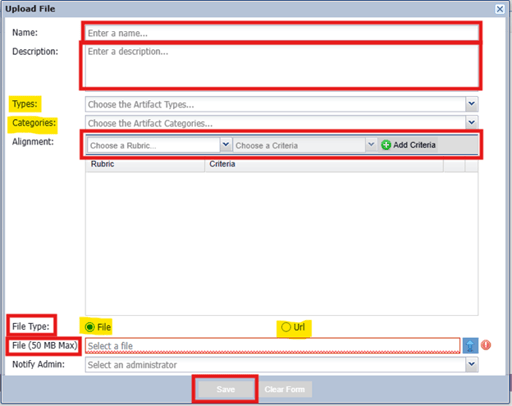
To view the artifacts aligned to the standards right after uploading, make sure to refresh your screen.
For districts not requiring the documentation log in non-summary years, see below:
During the non-summary years of the evaluation cycle, the artifact file will serve as a secure storage location for all your artifacts. However, in the summary year, there will be a dedicated documentation log in the evaluation process. Rest assured that the system will automatically transfer all your artifacts from the artifact files to the documentation log.
Before the start of the summary year, make sure to edit or delete any artifacts in the artifact file. You have the option to let all artifacts go to the documentation log and then revise them. However, if all artifacts are automatically transferred to the documentation log in the summary year, you will need to go back to the artifact file to make any necessary revisions.
When editing or deleting artifacts, it is important to do so directly in the artifact file, which is the place of origin. When you are completing the reflection in the documentation log, you can easily access reflection notes from non-summary years by scrolling down to the artifacts under each standard on the documentation log page. To view the original notes that were placed in the description field of the artifact file, simply click on the blue icon. This will be helpful when you are working on the reflection section of the documentation log.